Keyframe-Only Video Loading in vLLM: The Accuracy-Throughput Trade
eBay has billions of videos and a steady stream of classification jobs over them: a video plus a classification prompt goes to a vision-language model, and the answer is one multiple-choice token. A typical job is 1,000–2,000 short low-resolution clips run offline through vLLM’s LLM.chat with max_tokens=1, so there is no generation phase: the run is prefill, and every input-side cost sits on the critical path. Profiling these jobs (Qwen2.5-VL-7B-Instruct, one A100, TP=1) put video decode at 28–44% of wall time depending on the dataset. The GPU waits while the CPU turns compressed video into pixel arrays.
PR #45203 is the workaround I proposed upstream: pyav_keyframes, an opt-in lossy video loader that decodes only keyframes, so decode work is at most num_frames single-frame decodes per clip regardless of clip length. What it buys and what it costs are both measurable. All numbers below are from public datasets, with full settings and tuning logs in offline_video_vllm.
Where decode time goes
Video codecs store a complete image only at periodic keyframes (I-frames). The frames between them are motion-compensated deltas: P-frames reference earlier frames, B-frames reference earlier and later ones. A keyframe plus the frames that depend on it forms a GOP (group of pictures), typically 2–10 s in web encodes.
Decoding an arbitrary frame means starting at its GOP’s keyframe and decoding forward, because P and B frames are meaningless alone. A lossless sparse sampler pays that GOP-prefix decode for every target it touches, however few targets it keeps. Keyframes have neither problem: decoding one costs one frame decode, and finding them costs no decode at all, since the demuxer reads packet headers that already carry a keyframe flag and a timestamp.
A loader that never decodes a delta frame
pyav_keyframes makes two passes over the container. The first demuxes the stream and records every keyframe timestamp; no pixels are decoded. The second spreads num_frames picks evenly over that keyframe list, then seeks to each pick and decodes exactly one frame. A 30-second clip and a 10-minute clip cost the same: one header sweep plus at most num_frames keyframe decodes.
When the budget exceeds the keyframe count, picks repeat instead of falling back to delta frames, and the repeats stay balanced: a 2-keyframe clip asked for 16 frames returns 8 copies of each. Repeated frames are decoded once and reported at their true source positions in the frame metadata, so a model like Qwen2.5-VL, which embeds each frame’s time position, sees the same moment twice rather than motion that never happened.
The sliders below replay the pick logic: set how many keyframes the clip has and how many frames the caller asks for, then compare the decode work of lossless uniform sampling against keyframe-only sampling for the same request.
The trade, measured
Setup: Qwen2.5-VL-7B-Instruct on one A100 (TP=1), offline LLM.chat, max_tokens=1, 16 frames per clip, 1,990 multiple-choice questions from NExTQA and MVBench. The two runs are identical except the video loader: lossless OpenCV sampling vs pyav_keyframes. End-to-end wall time drops from 674 s to 380 s and throughput rises from 2.95 to 5.23 req/s, a 1.77× speedup from the loader swap alone. At the decode stage, lossless sampling costs 193 ms on a 30 s clip and 3,124 ms on a 600 s clip; pyav_keyframes stays between 43 and 77 ms across all four test clips.
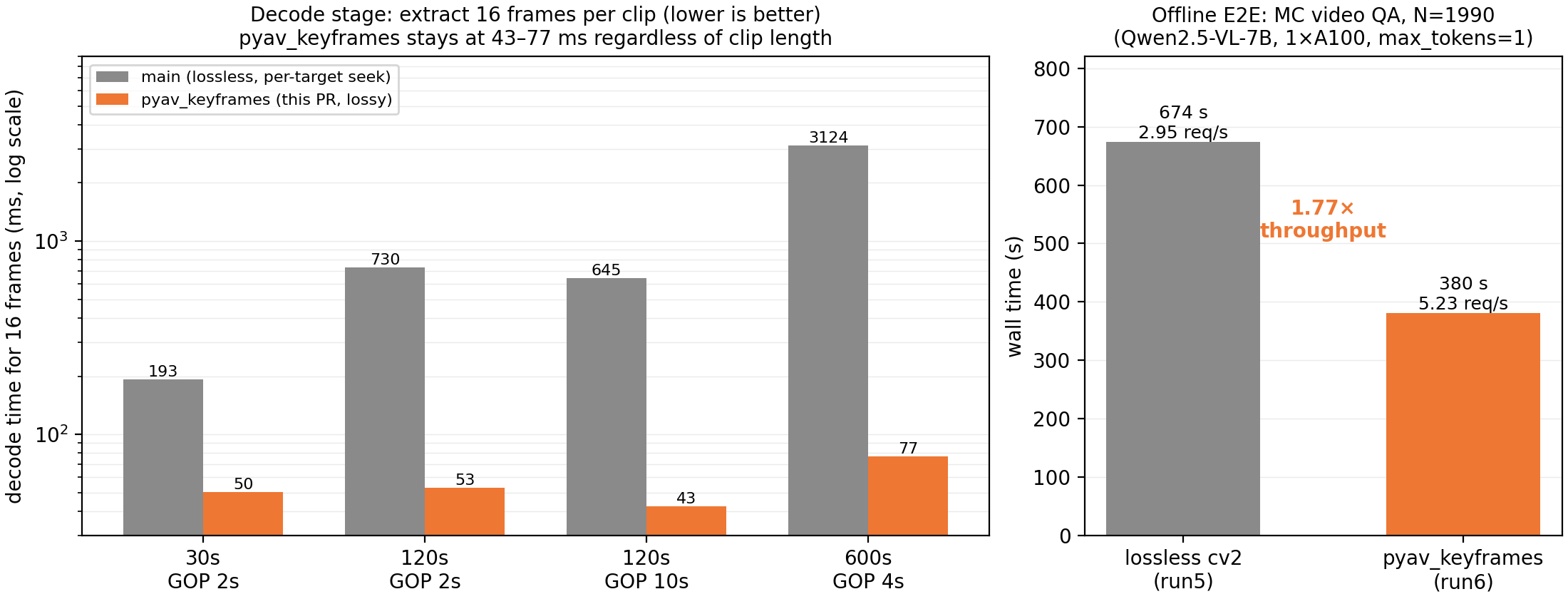
Left: decode time to extract 16 frames (log scale) across clip lengths and GOP settings. Right: end-to-end wall time on the N=1990 benchmark; the only change between bars is the video loader.
Accuracy is the other side of the trade. NExTQA, scene-content QA, is unchanged at 79.6 vs 79.5. MVBench drops 11.3 points overall, and the drop concentrates in motion-sensitive subtasks: action_antonym loses 52.7 points, moving_attribute and object_existence lose 36.4 each, while 10 of 18 subtasks stay within ±2 points. Keyframes land on scene boundaries, so prompts about what a scene contains keep their signal; prompts about what changes between keyframes lose it.
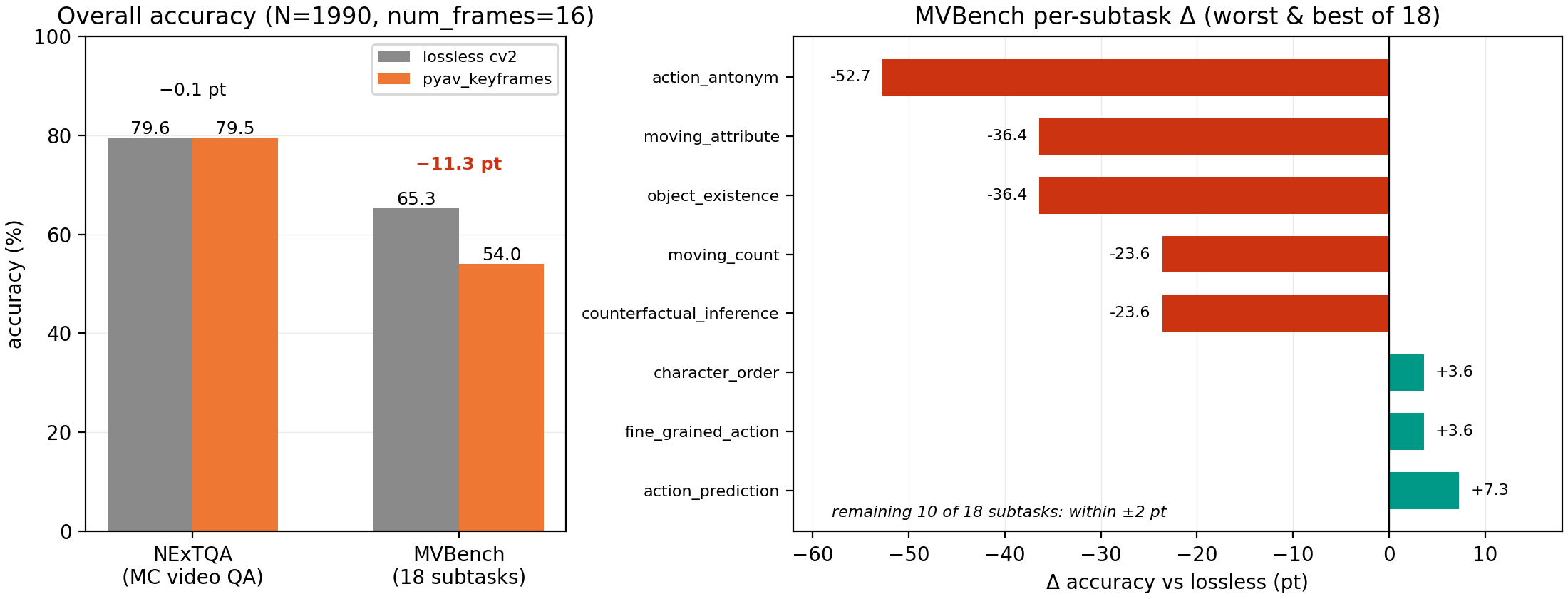
Left: overall accuracy, num_frames=16. Right: MVBench per-subtask deltas, the worst and best of 18 subtasks; the remaining 10 move less than ±2 pt.
The decode savings apply to every clip by construction; the accuracy cost lands only where the prompt needs inter-keyframe information. A classification job in the eBay mold, one-token answers about what the clip shows, matches the NExTQA column. Motion reasoning matches the action_antonym column and should stay on a lossless loader.
A case study in quoting out of context
Chinese has an idiom for this failure mode: 断章取义, judging a passage by a fragment taken out of context. Keyframe sampling does it to video. The two CLEVRER-based MVBench subtasks that drop 36.4 points each, moving_attribute and object_existence, are the extreme case: all 26 CLEVRER clips we probed carry exactly one keyframe, at frame 0, so pyav_keyframes returns the opening frame duplicated to fill the budget. The model is asked about a five-second video and shown its first instant, num_frames times.
The item below is a real object_existence row. The question asks about a purple sphere; the sphere rolls in at t≈2.0 s, so the answer is yes, and frame 0 cannot know that. Drag the budget down: uniform sampling loses its glimpses one by one and collapses to frame 0 at num_frames = 1; the keyframe row sits at frame 0 from the start. On encodes like this, num_frames stops being the knob that matters. The keyframe count is, and it is a property of the file, not of the request.
Frames from the CLEVRER validation set, via MVBench. The verdict lines describe the visible evidence in each sampled frame set; no model inference was run for this figure.
object_existence is 200 rows like this one; this mechanism is what its −36.4 pt aggregates.
Using it
The loader is opt-in; nothing changes unless a run selects the pyav_keyframes backend. Until the PR lands, the same loader ships as a single-file drop-in (pyav_keyframes_v2) in the experiment repo: importing the module registers it with vLLM’s loader registry, and the README has the exact LLM(...) configuration.
Links
- vLLM PR: vllm-project/vllm#45203, “[Multimodal] Add lossy keyframe-only video loader (pyav_keyframes)”
- Experiments and benchmarks (public datasets): WindChimeRan/offline_video_vllm